



参考地址:
使用的yaml文件
[root@k8s-master01 /root/k8s-1.27.1/yourls]# ls -l
总用量 24
-rw-r--r-- 1 root root 60 1月 25 23:48 01-ns-cm.yaml
-rw-r--r-- 1 root root 438 1月 26 00:50 02-yourls-pvc-mysql-data.yaml
-rw-r--r-- 1 root root 1576 1月 25 23:48 03-configmap-mysql.yaml
-rw-r--r-- 1 root root 1714 1月 25 23:52 04-yourls-mysql.yaml
-rw-r--r-- 1 root root 1558 1月 26 01:21 05-yourls.yaml
-rw-r--r-- 1 root root 1039 1月 26 00:09 06-ingress-halo.yaml
01-ns-cm.yaml
 ---
 apiVersion: v1
 kind: Namespace
 metadata:
   name: yourls
02-yourls-pvc-mysql-data.yaml
---
kind: PersistentVolumeClaim
apiVersion: v1
metadata:
name: yourls-mysql-data
namespace: yourls
spec:
accessModes:
- ReadWriteOnce
resources:
requests:
storage: 5Gi
storageClassName: nfs-csi
---
---
kind: PersistentVolumeClaim
apiVersion: v1
metadata:
name: yourls-data
namespace: yourls
spec:
accessModes:
- ReadWriteOnce
resources:
requests:
storage: 1Gi
storageClassName: nfs-csi
---
03-configmap-mysql.yaml
apiVersion: v1
kind: ConfigMap
metadata:
name: mysql-config
namespace: yourls
data:
my.cnf: |
# For advice on how to change settings please see
# http://dev.mysql.com/doc/refman/8.1/en/server-configuration-defaults.html
[mysqld]
#
# Remove leading # and set to the amount of RAM for the most important data
# cache in MySQL. Start at 70% of total RAM for dedicated server, else 10%.
# innodb_buffer_pool_size = 128M
#
# Remove leading # to turn on a very important data integrity option: logging
# changes to the binary log between backups.
# log_bin
#
# Remove leading # to set options mainly useful for reporting servers.
# The server defaults are faster for transactions and fast SELECTs.
# Adjust sizes as needed, experiment to find the optimal values.
# join_buffer_size = 128M
# sort_buffer_size = 2M
# read_rnd_buffer_size = 2M
# Remove leading # to revert to previous value for default_authentication_plugin,
# this will increase compatibility with older clients. For background, see:
# https://dev.mysql.com/doc/refman/8.1/en/server-system-variables.html#sysvar_default_authentication_plugin
# default-authentication-plugin=mysql_native_password
#innodb_force_recovery = 4
skip-host-cache
skip-name-resolve
datadir=/var/lib/mysql
socket=/var/run/mysqld/mysqld.sock
secure-file-priv=/var/lib/mysql-files
user=mysql
pid-file=/var/run/mysqld/mysqld.pid
[client]
socket=/var/run/mysqld/mysqld.sock
!includedir /etc/mysql/conf.d/
04-yourls-mysql.yaml
apiVersion: apps/v1
kind: StatefulSet
metadata:
name: yourls-mysql
namespace: yourls
labels:
app: yourls-mysql
spec:
replicas: 1
selector:
matchLabels:
app: yourls-mysql
template:
metadata:
labels:
app: yourls-mysql
spec:
containers:
- name: yourls-mysql
image: harbor.yq.com/library/mysql:8.1.0
#command: ["tail"]
#args:
# - "-f"
# - "/dev/null"
command: ["docker-entrypoint.sh"]
args:
- "--default-authentication-plugin=caching_sha2_password"
- "--character-set-server=utf8mb4"
- "--collation-server=utf8mb4_general_ci"
- "--explicit_defaults_for_timestamp=true"
volumeMounts:
- mountPath: /var/lib/mysql
name: yourls-mysql-data
- name: mysql-config
mountPath: /etc/my.cnf
subPath: my.cnf
env:
- name: MYSQL_ROOT_PASSWORD
value: "xxxxxxxxx"
- name: MYSQL_DATABASE
value: "yourls"
livenessProbe:
exec:
command:
- mysqladmin
- ping
- -h
- 127.0.0.1
- --silent
initialDelaySeconds: 30
periodSeconds: 3
failureThreshold: 5
resources:
requests:
memory: "128Mi"
cpu: "10m"
limits:
memory: "1024Mi"
cpu: 1
volumes:
- name: yourls-mysql-data
persistentVolumeClaim:
claimName: yourls-mysql-data
- name: mysql-config
configMap:
name: mysql-config
items:
- key: my.cnf
path: my.cnf
05-yourls.yaml
apiVersion: apps/v1
kind: StatefulSet
metadata:
name: yourls
namespace: yourls
labels:
app: yourls
spec:
replicas: 1
selector:
matchLabels:
app: yourls
template:
metadata:
labels:
app: yourls
spec:
#nodeName: k8s-node02
hostAliases:
- ip: "192.168.2.107"
hostnames:
- "alist2.yq.com"
containers:
- name: yourls
image: harbor.yq.com/library/yourls:1.9.2-apache
imagePullPolicy: IfNotPresent
volumeMounts:
- mountPath: /var/www/html
name: yourls-data
env:
- name: YOURLS_DB_HOST
value: "yourls-mysql:3306"
- name: YOURLS_DB_USER
value: "root"
- name: YOURLS_DB_PASS
value: "xxxxxxxxx"
- name: YOURLS_DB_NAME
value: "yourls"
- name: YOURLS_USER
value: "test"
- name: YOURLS_PASS
value: "xxxxxxxxx"
- name: YOURLS_SITE
value: "https://you.yqis.top"
ports:
- containerPort: 80
livenessProbe:
httpGet:
path: /actuator/health/readiness
port: 80
initialDelaySeconds: 30
periodSeconds: 30
timeoutSeconds: 5
failureThreshold: 5
resources:
requests:
memory: "128Mi"
cpu: "10m"
limits:
memory: "512Mi"
cpu: 1
volumes:
- name: yourls-data
persistentVolumeClaim:
claimName: yourls-data
06-ingress-halo.yaml
---
apiVersion: v1
kind: Service
metadata:
name: yourls-node-svc
namespace: yourls
labels:
app: yourls
spec:
type: NodePort
selector:
app: yourls
ports:
- name: yourls
port: 8088
protocol: TCP
targetPort: 80
---
apiVersion: v1
kind: Service
metadata:
name: yourls-mysql
namespace: yourls
spec:
selector:
app: yourls-mysql
ports:
- protocol: TCP
port: 3306
targetPort: 3306
type: ClusterIP
---
apiVersion: networking.k8s.io/v1
kind: Ingress
metadata:
name: yourls-ingress
namespace: yourls
annotations:
nginx.ingress.kubernetes.io/proxy-body-size: "100m"
nginx.ingress.kubernetes.io/proxy-connect-timeout: "300"
nginx.ingress.kubernetes.io/proxy-read-timeout: "300"
nginx.ingress.kubernetes.io/proxy-send-timeout: "300"
spec:
ingressClassName: nginx
rules:
- host: yourls.yq.com
http:
paths:
- path: /
pathType: Prefix
backend:
service:
name: yourls-node-svc
port:
number: 8088
部署教程
  kubectl apply -f 01-ns-cm.yaml
  kubectl apply -f 02-yourls-pvc-mysql-data.yaml
  kubectl apply -f 03-configmap-mysql.yaml
  kubectl apply -f 04-yourls-mysql.yaml
  kubectl apply -f 05-yourls.yaml
  kubectl apply -f 06-ingress-halo.yaml
使用教程
只能通过 05-yourls.yaml 中的 YOURLS_SITE 变量值进入后台,我的地址为:https://you.yqis.top/admin/install.php ,账号密为 YOURLS_USER 和 YOURLS_PASS 的变量值
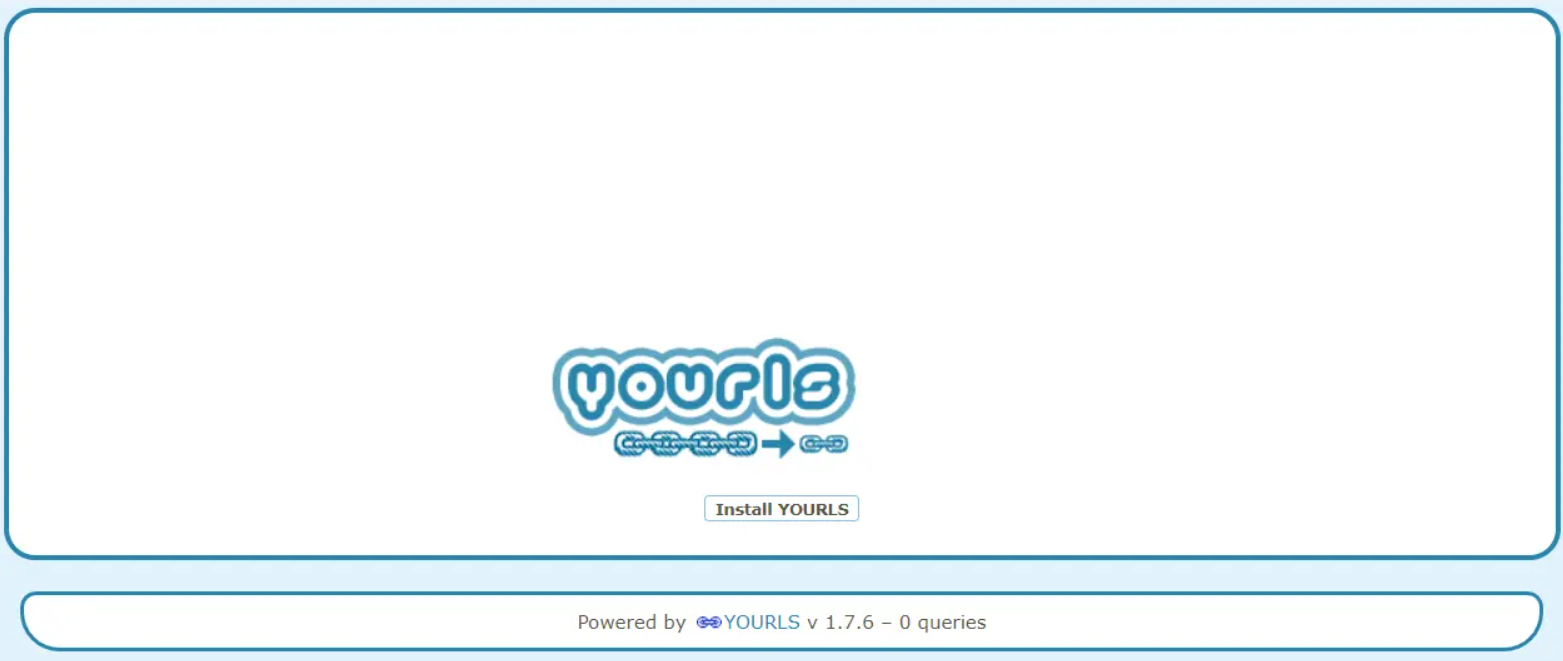
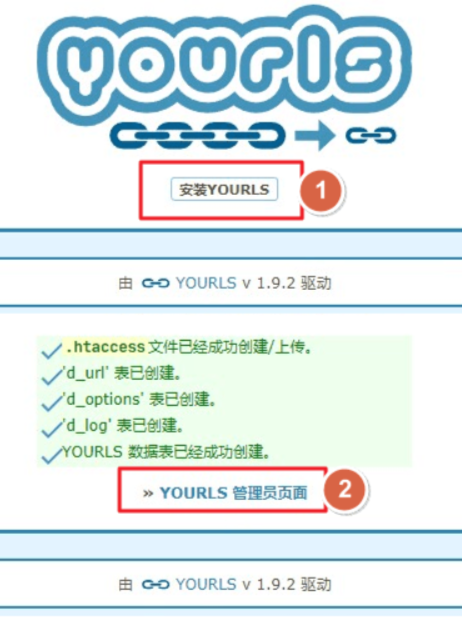
访问 http(s)://您的域名/admin/install.php ,点击“安装YOURLS”
安装好后点击管理员页面登录我们在配置文件写的帐号密码
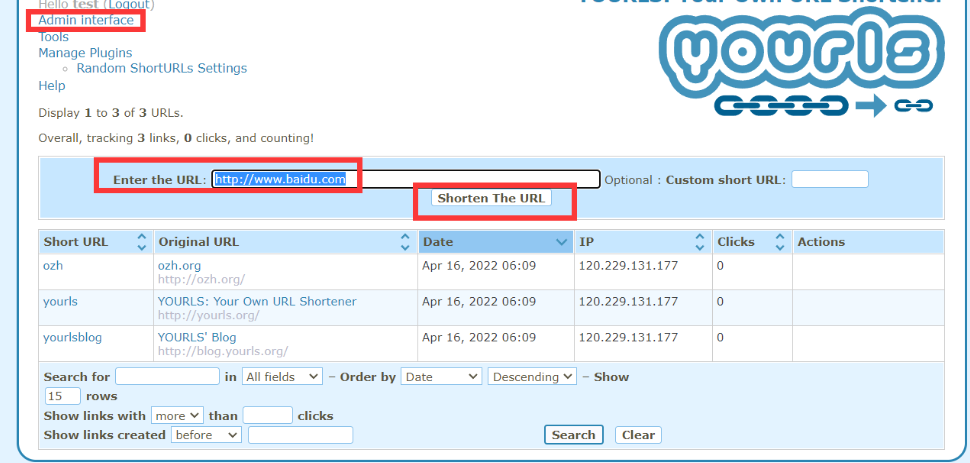
正式使用,生成短链接
其他
随机短链接
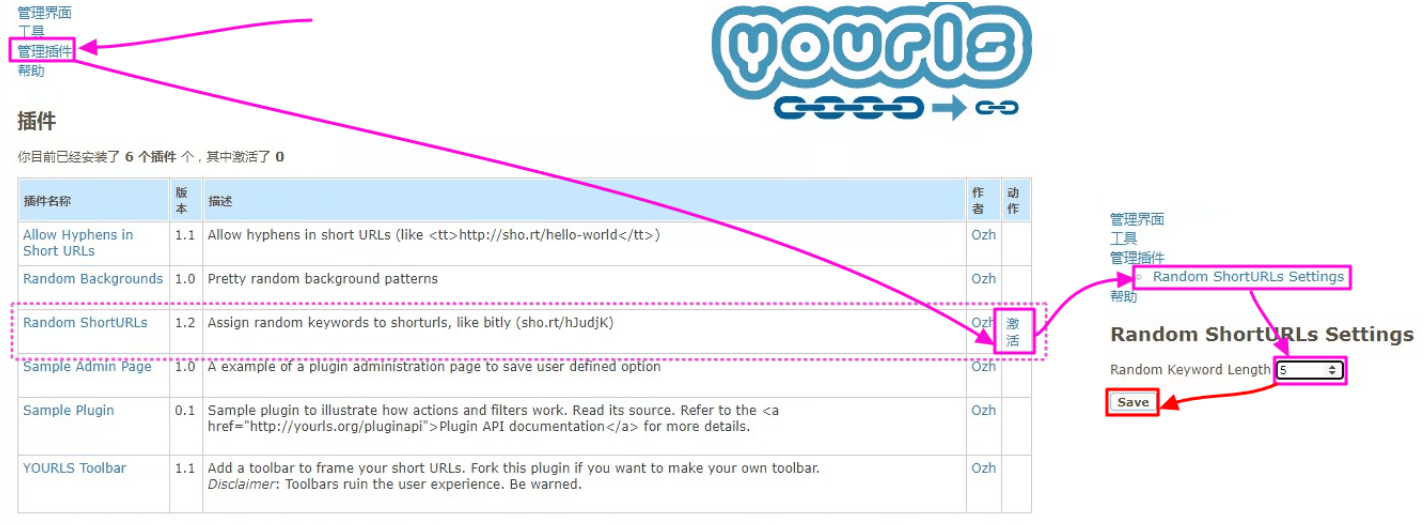
Q:默认使用的是固定的一位数开始递增的,我想让他随机{4/5}位数的怎么设置??
A:进入短连接程序后台,点击管理插件找到 Random ShortURLs 在右侧激活,激活后在管理插件下方能看到配置,点击进去可以设置自己需要的随机位数
自定义短链接
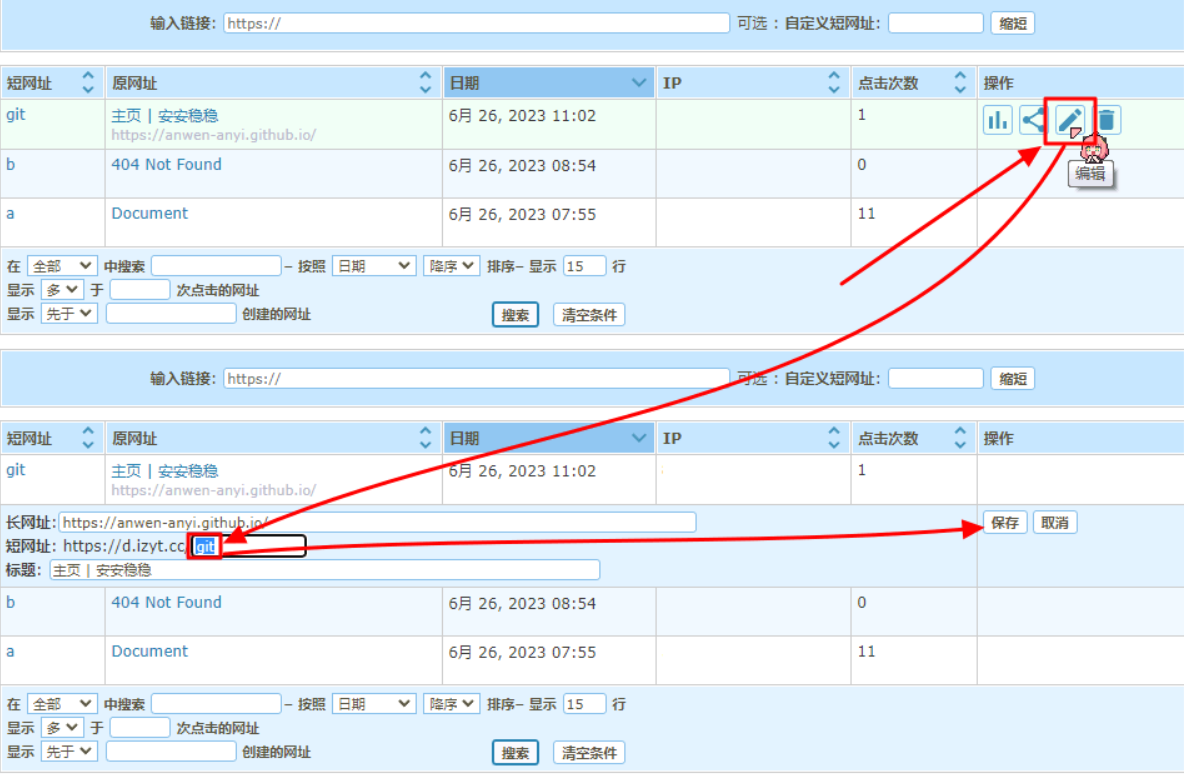
Q:我想给某个已经设置好的短链接设修改成我自己想设置的,怎么做?
A:进入短连接程序后台进行修改即可(如下图)
防止被爆破
修改 /admin文件夹为你想改的名字,然后在/user目录新建cache.php内容如下:
 <?php
 // introduce a new filter early, before plugins are actually loaded
 yourls_add_filter( 'admin_url', 'ozh_custom_admin_url' );
 function ozh_custom_admin_url($url) {
     return str_replace('/admin/', '/想要得目录名/', $url);
}可能会被爆破的围观链接:https://github.com/YOURLS/YOURLS/pull/2747#issuecomment-689047797
评论区