14 服务管理
6版本
一、概念
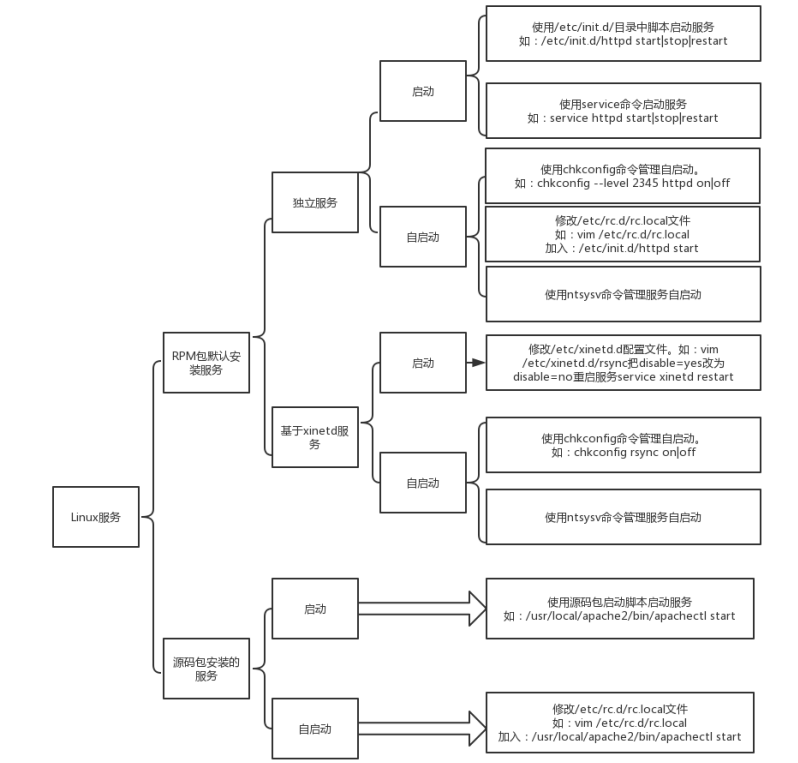
1 服务分类
2 查询服务
#查看服务在级别下的状态
[root@localhost ~]# chkconfig --list
auditd         	0:关闭	1:关闭	2:启用	3:启用	4:启用	5:启用	6:关闭
crond          	0:关闭	1:关闭	2:启用	3:启用	4:启用	5:启用	6:关闭
ip6tables      	0:关闭	1:关闭	2:启用	3:启用	4:启用	5:启用	6:关闭
iptables       	0:关闭	1:关闭	2:启用	3:启用	4:启用	5:启用	6:关闭
kdump          	0:关闭	1:关闭	2:关闭	3:启用	4:启用	5:启用	6:关闭
mdmonitor      	0:关闭	1:关闭	2:启用	3:启用	4:启用	5:启用	6:关闭
messagebus     	0:关闭	1:关闭	2:启用	3:启用	4:启用	5:启用	6:关闭
netconsole     	0:关闭	1:关闭	2:关闭	3:关闭	4:关闭	5:关闭	6:关闭
netfs          	0:关闭	1:关闭	2:关闭	3:启用	4:启用	5:启用	6:关闭
network        	0:关闭	1:关闭	2:启用	3:启用	4:启用	5:启用	6:关闭
nfs-rdma       	0:关闭	1:关闭	2:关闭	3:关闭	4:关闭	5:关闭	6:关闭
postfix        	0:关闭	1:关闭	2:启用	3:启用	4:启用	5:启用	6:关闭
rdisc          	0:关闭	1:关闭	2:关闭	3:关闭	4:关闭	5:关闭	6:关闭
rdma           	0:关闭	1:关闭	2:关闭	3:关闭	4:关闭	5:关闭	6:关闭
restorecond    	0:关闭	1:关闭	2:关闭	3:关闭	4:关闭	5:关闭	6:关闭
rsyslog        	0:关闭	1:关闭	2:启用	3:启用	4:启用	5:启用	6:关闭
saslauthd      	0:关闭	1:关闭	2:关闭	3:关闭	4:关闭	5:关闭	6:关闭
sshd           	0:关闭	1:关闭	2:启用	3:启用	4:启用	5:启用	6:关闭
udev-post      	0:关闭	1:启用	2:启用	3:启用	4:启用	5:启用	6:关闭
## 系统级别

0  		1  			2  					  3 		 4 		 5  	  6
关机    救援模式    字符界面(少了服务的)    完整纯字符    保留    图形化    重启
二 rpm安装的服务管理
1 独立服务器管理
1) 启动
#绝对路径启动
[root@localhost ~]# /etc/init.d/httpd start
正在启动 httpd:httpd: Could not reliably determine the server's fully qualified domain name, using localhost.localdomain for ServerName
                                                           [确定]
#通过service启动
[root@localhost ~]# service httpd restart
停止 httpd:                                               [确定]
正在启动 httpd:httpd: Could not reliably determine the server's fully qualified domain name, using localhost.localdomain for ServerName
                                                           [确定]
2) 开机自启动
在不同系统级别下的,服务的状态,以实现开机自启动
chkconfig		--level		级别		服务			on			#系统在级别下,启动服务

chkconfig		--level		级别		服务			on			#系统在级别下,停用服务
[root@localhost ~]# chkconfig --list httpd											#查看httpd服务与系统级别关系
httpd          	0:关闭	1:关闭	2:关闭	3:关闭	4:关闭	5:关闭	6:关闭
[root@localhost ~]# chkconfig --level 2345 httpd on									#在2345系统级别启动httpd服务
[root@localhost ~]# chkconfig --list httpd											#查看httpd服务与系统级别关系
httpd          	0:关闭	1:关闭	2:启用	3:启用	4:启用	5:启用	6:关闭
3) ntsysv 图形化工具 不要使用
2 基于xinetd服务的管理
监听端口,访问慢,一般不使用
启动
[root@localhost ~]# yum -y install xinetd						#安装xinetd

[root@localhost ~]# vim /etc/xinetd.d/rsync												#修改配置文件

# default: off
# description: The rsync server is a good addition to an ftp server, as it \
#       allows crc checksumming etc.
service rsync
{
        disable = no																		#将禁用关闭,表示启用
        flags           = IPv6
        socket_type     = stream
        wait            = no
        user            = root
        server          = /usr/bin/rsync
        server_args     = --daemon
        log_on_failure  += USERID
}

[root@localhost ~]# netstat -anpt | grep xinetd						#检查xinetd服务未开启
[root@localhost ~]# service xinetd start 							#启动xinetd服务
正在启动 xinetd:                                          [确定]
[root@localhost ~]# netstat -anpt | grep xinetd						#xinetd服务开启成功,找到对应端口
tcp        0      0 :::873                      :::*                        LISTEN      1864/xinetd
自启动
[root@localhost ~]# chkconfig rsync on && chkconfig --list rsync			#设置rsync服务开机自启,查看级别对应rsync服务状态
rsync          	启用
三 源码包安装的服务管理(apache为例子)
1) 关闭,关闭rpm包安装的httpd
[root@localhost ~]# /etc/init.d/httpd stop 			#停用httpd
停止 httpd:                                               [确定]
[root@localhost ~]# yum -y remove httpd				#卸载httpd
2) 安装apache
## 挂载格式:
		挂载iso文件		mount		-o		loop		iso文件位置		挂载点

[root@localhost ~]# mount -o loop /root/LAMP-64.iso /disk1
将挂载点下所需要的的压缩包复制到指定位置,并解压
安装
#yum安装所需要的编译语言
[root@localhost lamp]# yum -y install gcc* zlib zlib-devel pcre pcre-devel

#安装apr
[root@localhost lamp]# cd /lamp/apr-1.4.6 && ./configure  && make && make install

[root@localhost apr-1.4.6]# cd /lamp/apr-util-1.4.1 && ./configure --with-apr=/usr/local/apr/ && make && make install

#安装apache
[root@localhost apr-util-1.4.1]# cd /lamp/httpd-2.4.7 && ./configure --prefix=/usr/local/apache && make && make install

[root@localhost ~]# ls /usr/local/			#查看apache是否安装成功
apache  apr  bin  etc  games  include  lib  lib64  libexec  sbin  share  src
[root@localhost ~]# netstat -anpt			#检查端口
Active Internet connections (servers and established)
Proto Recv-Q Send-Q Local Address               Foreign Address             State       PID/Program name
tcp        0      0 0.0.0.0:22                  0.0.0.0:*                   LISTEN      1270/sshd
tcp        0      0 127.0.0.1:25                0.0.0.0:*                   LISTEN      1349/master
tcp        0      0 192.168.18.136:22           192.168.18.1:7970           ESTABLISHED 1476/sshd
tcp        0      0 :::22                       :::*                        LISTEN      1270/sshd
tcp        0      0 ::1:25                      :::*                        LISTEN      1349/master
[root@localhost ~]# /usr/local/apache/bin/apachectl start 		#启用apache
AH00558: httpd: Could not reliably determine the server's fully qualified domain name, using localhost.localdomain. Set the 'ServerName' directive globally to suppress this message
[root@localhost ~]# echo $?
0
[root@localhost ~]# netstat -napt | grep 80						#80端口开启,apache启动成功
tcp        0      0 :::80                       :::*                        LISTEN      30017/httpd
启动apache
[root@localhost ~]# /usr/local/apache/bin/apachectl start
AH00558: httpd: Could not reliably determine the server's fully qualified domain name, using localhost.localdomain. Set the 'ServerName' directive globally to suppress this message
httpd (pid 30017) already running
停用apache
[root@localhost ~]# /usr/local/apache/bin/apachectl stop
AH00558: httpd: Could not reliably determine the server's fully qualified domain name, using localhost.localdomain. Set the 'ServerName' directive globally to suppress this message
启动写入配置文件 /etc/rc.d/rc.local
[root@localhost ~]# vim /etc/rc.d/rc.local

#!/bin/sh
#
# This script will be executed *after* all the other init scripts.
# You can put your own initialization stuff in here if you don't
# want to do the full Sys V style init stuff.

touch /var/lock/subsys/local
/usr/local/apache/bin/apachectl start
3) 让service能管理源码包安装的服务(创建软链接)
-
绝对路径的方式关闭服务
-
创建软链接
#绝对路径的方式关闭服务
[root@localhost ~]# /usr/local/apache/bin/apachectl stop
AH00558: httpd: Could not reliably determine the server's fully qualified domain name, using localhost.localdomain. Set the 'ServerName' directive globally to suppress this message
#创建软链接
[root@localhost ~]# ln -s /usr/local/apache/bin/apachectl /etc/init.d/apache
#service启动apache
[root@localhost ~]# service apache start
AH00558: httpd: Could not reliably determine the server's fully qualified domain name, using localhost.localdomain. Set the 'ServerName' directive globally to suppress this message
[root@localhost ~]# netstat -anpt |grep httpd		#端口开启成功
tcp        0      0 :::80                       :::*                        LISTEN      1513/httpd
#service停用apache
[root@localhost ~]# service apache stop
AH00558: httpd: Could not reliably determine the server's fully qualified domain name, using localhost.localdomain. Set the 'ServerName' directive globally to suppress this message
[root@localhost ~]# netstat -anpt | grep 80			#80端口关闭
4) 让chkconfig能管理源码包安装的服务
修改配置文件并启用
[root@localhost ~]# vim /etc/init.d/apache 		#修改配置文件

#!/bin/sh
#
#chkconfig:2345 86 76
#description:yq

[root@localhost ~]# chkconfig --add apache		#将配置加入chkconfig
[root@localhost ~]# chkconfig --list apache		#检查
apache         	0:关闭	1:关闭	2:启用	3:启用	4:启用	5:启用	6:关闭
7版本
systemd替代了6版本的init
systemd优势
并行启动服务
命令简单,systemctl可以实现所有功能
有服务依赖检测并解决
1 systemd配置文件
/usr/lib/systemd/system			#服务启动脚本存放位置

/run/systemd/system				#系统执行过程中产生的服务脚本

/etc/systemd/system				#管理根据需要创建的服务脚本
2 systemctl 选项 服务
		reload			#不关闭服务,重新读取服务配置文件
		status			#检查服务状态
		is-enabled		#检查服务是否开机自启动
[root@localhost ~]# systemctl reload sshd			#不关闭服务,重新读取服务配置文件
[root@localhost ~]# systemctl status sshd			#检查服务状态
● sshd.service - OpenSSH server daemon
   Loaded: loaded (/usr/lib/systemd/system/sshd.service; enabled; vendor preset: enabled)
   Active: active (running) since 四 2022-09-22 20:00:47 CST; 47s ago
     Docs: man:sshd(8)
           man:sshd_config(5)
  Process: 14904 ExecReload=/bin/kill -HUP $MAINPID (code=exited, status=0/SUCCESS)
 Main PID: 14493 (sshd)
   CGroup: /system.slice/sshd.service
           └─14493 /usr/sbin/sshd -D

9月 22 20:00:47 localhost.localdomain systemd[1]: Starting OpenSSH server daemon...
9月 22 20:00:47 localhost.localdomain sshd[14493]: Server listening on 0.0.0.0 port 22.
9月 22 20:00:47 localhost.localdomain sshd[14493]: Server listening on :: port 22.
9月 22 20:00:47 localhost.localdomain systemd[1]: Started OpenSSH server daemon.
9月 22 20:01:00 localhost.localdomain sshd[14866]: Accepted password for root from 192.168.18.1 port 9914 ssh2
9月 22 20:01:22 localhost.localdomain systemd[1]: Reloading OpenSSH server daemon.
9月 22 20:01:22 localhost.localdomain sshd[14493]: Received SIGHUP; restarting.
9月 22 20:01:22 localhost.localdomain systemd[1]: Reloaded OpenSSH server daemon.
9月 22 20:01:22 localhost.localdomain sshd[14493]: Server listening on 0.0.0.0 port 22.
9月 22 20:01:22 localhost.localdomain sshd[14493]: Server listening on :: port 22.
[root@localhost ~]# systemctl is-enabled sshd		#检查服务是否开机自启动
enabled
常见后缀
 	.service			#服务,服务单元
 	.tarhet				#环境
3 检查系统服务
[root@localhost ~]# systemctl list-units	#显示当前启动unit
[root@localhost ~]# systemctl list-units --all		#显示所有unit,包括未启用的
[root@localhost ~]# systemctl list-unit-files		#显示/usr/lib/systemd/system的unit状态
4 切换操作环境
1.graphical.target:图形化界面。
2.multi-user.target:命令行模式。
3.rescue.target:救援模式。
4.emergency.target:紧急处理系统的错误,需要使用root登录,再无法使用 rescue.target的情况下可以尝试使用此模式。
5.shutdown.target:关机。
[root@localhost ~]# systemctl set-default multi-user.target				#更改默认启动级别为纯字符	init3
Removed symlink /etc/systemd/system/default.target.
Created symlink from /etc/systemd/system/default.target to /usr/lib/systemd/system/multi-user.target.
[root@localhost ~]# systemctl get-default								#查看
multi-user.target
[root@localhost ~]# systemctl set-default graphical.target				#更改默认启动级别为图形化	init5
Removed symlink /etc/systemd/system/default.target.
Created symlink from /etc/systemd/system/default.target to /usr/lib/systemd/system/graphical.target.
[root@localhost ~]# systemctl get-default								#查看
graphical.target
5 管理源码包安装的服务(nginx为例)
安装nginx
[root@localhost ~]# tar -xvf nginx-1.18.0.tar.gz			#解压源码包

[root@localhost nginx-1.18.0]# yum -y install gcc* zlib zlib-devel pcre pcre-devel		#安装语言及函数依赖关系

[root@localhost nginx-1.18.0]# ./configure --prefix=/usr/local/nginx && make && make install 		#安装nginx

[root@localhost ~]# ls /usr/local										#检查
bin  etc  games  include  lib  lib64  libexec  nginx  sbin  share  src
[root@localhost ~]# /usr/local/nginx/sbin/nginx 					#启动nginx
[root@localhost ~]# netstat -anpt |grep 80							#检查nginx80端口开启成功
tcp        0      0 0.0.0.0:80              0.0.0.0:*               LISTEN      17552/nginx: master
开机自启动设置
 	将源码包开启服务的方式,写入/etc/rc.d/rc.local文件中
 	7版本需要给rc.local文件可执行权限
[root@localhost ~]# vim /etc/rc.d/rc.local				#写入/etc/rc.d/rc.local文件中

#!/bin/bash
# THIS FILE IS ADDED FOR COMPATIBILITY PURPOSES
#
# It is highly advisable to create own systemd services or udev rules
# to run scripts during boot instead of using this file.
#
# In contrast to previous versions due to parallel execution during boot
# this script will NOT be run after all other services.
#
# Please note that you must run 'chmod +x /etc/rc.d/rc.local' to ensure
# that this script will be executed during boot.

touch /var/lock/subsys/local
/usr/local/nginx/sbin/nginx


[root@localhost ~]# chmod +x /etc/rc.d/rc.local 			#给rc.local可执行权限
将服务加入systemctl管理
	绝对路径关闭源码包安装的服务
 	将.service文件复制到/usr/lib/systemd/system/中
 	启用配置
[root@localhost ~]# cp /root/nginx.service  /usr/lib/systemd/system/			#复制.service文件
[root@localhost ~]# systemctl daemon-reload										#启用配置文件
[root@localhost ~]# systemctl start nginx										#启动nginx
[root@localhost ~]# netstat -anpt | grep 80										#检查80端口
tcp        0      0 0.0.0.0:80              0.0.0.0:*               LISTEN      17638/nginx: master
[root@localhost ~]# systemctl status nginx										#查看nginx
● nginx.service - nginx
   Loaded: loaded (/usr/lib/systemd/system/nginx.service; disabled; vendor preset: disabled)
   Active: active (running) since 四 2022-09-22 20:32:15 CST; 30s ago
  Process: 17637 ExecStart=/usr/local/nginx/sbin/nginx (code=exited, status=0/SUCCESS)
 Main PID: 17638 (nginx)
   CGroup: /system.slice/nginx.service
           ├─17638 nginx: master process /usr/local/nginx/sbin/nginx
           └─17639 nginx: worker process

9月 22 20:32:15 localhost.localdomain systemd[1]: Starting nginx...
9月 22 20:32:15 localhost.localdomain systemd[1]: Started nginx.
(apache为例)
[root@localhost ~]# mkdir /lamp /disk1
[root@localhost ~]# df -h
文件系统        容量  已用  可用 已用% 挂载点
/dev/sda3        20G  1.6G   18G    8% /
devtmpfs        476M     0  476M    0% /dev
tmpfs           487M     0  487M    0% /dev/shm
tmpfs           487M  7.7M  479M    2% /run
tmpfs           487M     0  487M    0% /sys/fs/cgroup
/dev/sda1       509M  120M  389M   24% /boot
tmpfs            98M     0   98M    0% /run/user/0
/dev/sr0        4.3G  4.3G     0  100% /mnt
[root@localhost ~]# yum makecache
已加载插件:fastestmirror
Loading mirror speeds from cached hostfile
c7-media                                                                                                                  | 3.6 kB  00:00:00
元数据缓存已建立
[root@localhost ~]#
[root@localhost ~]#
[root@localhost ~]#
[root@localhost ~]#
[root@localhost ~]# mount -o loop /root/LAMP-64.iso /disk1
mount: /dev/loop0 写保护,将以只读方式挂载
[root@localhost ~]# cp -a /disk1/lamp/* /lamp/
[root@localhost ~]# cd /lamp/

#安装gcc*、zlib、pcre、apr、apr-util、apache
[root@localhost lamp]# yum -y install gcc* zlib zlib-devel pcre pcre-devel && cd /lamp/apr-1.4.6 && ./configure && make && make install && cd /lamp/apr-util-1.4.1 && ./configure --with-apr=/usr/local/apr && make && make install && cd /lamp/httpd-2.4.7 && ./configure --prefix=/usr/local/apache && make -j 4 && make install

#apache加入开机自启动
[root@localhost httpd-2.4.7]# ls /usr/local/
apache  apr  bin  etc  games  include  lib  lib64  libexec  nginx  sbin  share  src
[root@localhost httpd-2.4.7]# netstat -anpt |grep 80
tcp        0      0 0.0.0.0:80              0.0.0.0:*               LISTEN      17638/nginx: master
[root@localhost httpd-2.4.7]# systemctl stop nginx
[root@localhost httpd-2.4.7]# netstat -anpt |grep 80
[root@localhost httpd-2.4.7]# /usr/local/apache/bin/apachectl start
AH00558: httpd: Could not reliably determine the server's fully qualified domain name, using localhost.localdomain. Set the 'ServerName' directive globally to suppress this message
[root@localhost httpd-2.4.7]# netstat -anpt |grep 80
tcp6       0      0 :::80                   :::*                    LISTEN      46473/httpd
[root@localhost httpd-2.4.7]# echo "/usr/local/apache/bin/apachectl start" >> /etc/rc.d/rc.local	#apache加入开机自启动
[root@localhost httpd-2.4.7]#
[root@localhost httpd-2.4.7]# tail -n 3 /etc/rc.d/rc.local
touch /var/lock/subsys/local
/usr/local/nginx/sbin/nginx
/usr/local/apache/bin/apachectl start

#apache加入systemctl管理
[root@localhost ~]# touch apache.service
[root@localhost ~]# vim apache.service
[root@localhost ~]# cat /usr/lib/systemd/system/apache.service
[Unit]
Description=apache
After=network.target

[Service]
Type=forking
ExecStart=/usr/local/apache/bin/apachectl
ExecReload=/usr/local/apache/bin/apachectl  reload
ExecStop=/usr/local/apache/bin/apachectl  stop
PrivateTmp=true

[Install]
WantedBy=multi-user.target

[root@localhost ~]# cp /root/apache.service  /usr/lib/systemd/system/
[root@localhost ~]# systemctl daemon-reload
[root@localhost ~]# systemctl status apache
● apache.service - apache
   Loaded: loaded (/usr/lib/systemd/system/apache.service; disabled; vendor preset: disabled)
   Active: inactive (dead)

9月 22 21:15:45 localhost.localdomain systemd[1]: [/usr/lib/systemd/system/apache.…ent
9月 22 21:15:45 localhost.localdomain systemd[1]: [/usr/lib/systemd/system/apache.…行
Hint: Some lines were ellipsized, use -l to show in full.

[root@localhost ~]# systemctl restart apache
[root@localhost ~]# netstat -anpt | grep 80
tcp6       0      0 :::80                   :::*                    LISTEN      46473/httpd

[root@localhost ~]# systemctl status apache
● apache.service - apache
   Loaded: loaded (/usr/lib/systemd/system/apache.service; disabled; vendor preset: disabl
   Active: active (running) since 四 2022-09-22 21:28:09 CST; 3s ago
  Process: 46936 ExecStart=/usr/local/apache/bin/apachectl (code=exited, status=0/SUCCESS)
 Main PID: 46939 (httpd)
   CGroup: /system.slice/apache.service
           ├─46939 /usr/local/apache/bin/httpd
           ├─46940 /usr/local/apache/bin/httpd
           ├─46941 /usr/local/apache/bin/httpd
           └─46942 /usr/local/apache/bin/httpd

9月 22 21:28:09 localhost.localdomain systemd[1]: Starting apache...
9月 22 21:28:09 localhost.localdomain apachectl[46936]: AH00558: httpd: Could not reliably
9月 22 21:28:09 localhost.localdomain systemd[1]: Started apache.
Hint: Some lines were ellipsized, use -l to show in full.
15 启动流程
[root@localhost ~]# uname -r				#查看当前版本内核版本
2.6.32-642.el6.x86_64
[root@localhost ~]# cat /etc/redhat-release		#查看当前系统版本
CentOS release 6.8 (Final)
6版本启动
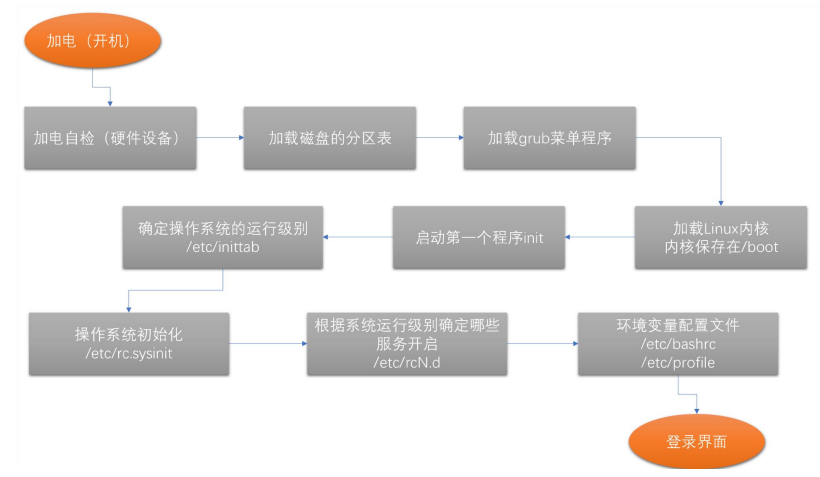
1.1 开机加电自检 BIOS有关
1.2 磁盘分区引导
BIOS引导的存储设备,引导分区表,加入内存运行
1.3 grub菜单引导
引导菜单(多系统选择、内核版本选择)
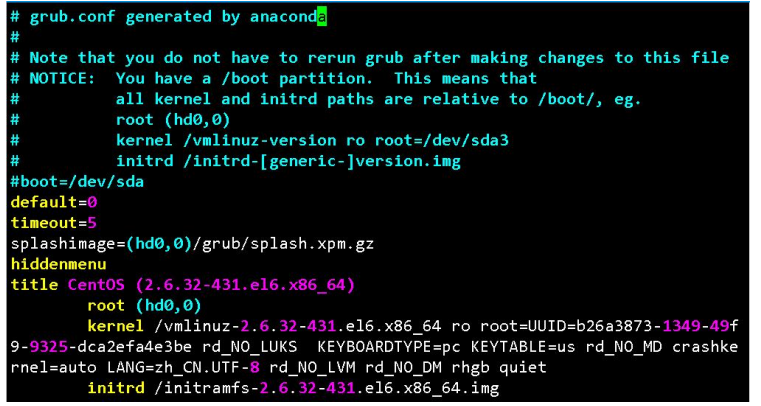
default:		定义默认启动的操作系统
timeout:		定义选择操作系统菜单的等待时间
splashimage:	指定我们选择 kernel 或操作系统菜单后面那张图片。
hiddenmenu:		表示隐藏选择操作系统的菜单,只有出现等待界面后按下 enter 键才会出现。如果没有这个字段, 则每次系统启动都会出现这个选择菜单。
title:grub 菜单”名称”。
		root:		用于指定 grub 所能识别的根,而不是根文件系统。
		kernel:		用于指定系统的内核文件的位置 initrd:帮助 kernel 完成系统的启动,例如加载根文件系统所在分区的驱动等。
		password:	设定密码。放在 title 外表示进入操作系统等待菜单的编辑模式需要密码,而放在 title 内表示启 动对应的操作系统需要密码,密码可以是明文或是用 MD5 进行加密过的。可以防止其他人编辑菜单进入单用户模 式启动系统。
1.4 加载内核
1.5 运行init
1.6 /etc/inittab
[root@localhost ~]# tail -n 3 /etc/inittab
#   6 - reboot (Do NOT set initdefault to this)
#
id:3:initdefault:					#6版本修改系统启动级别,类似systemctl set-default	选项
系统运行级别:/etc/inittab 中 runlevel 分为 0-6 ;7 个等级
0:关机,shutdown

1:单用户模式(sigle user),root 用户,无须认证;维护模式;

2:多用户模式(multi user),会启动网络功能,但不会启动 NFS;维护模式;

3:多用户模式(multi user),完全功能模式;文本界面;

4:预留级别:目前无特别使用目的,但习惯同 3 级别使用;

5:多用户模式(multi user),完全功能模式,图形界面;

6:重启模式
1.7 初始化系统
加载/etc/rc.sysinit 文件完成初始化,主要包括设置主机名,设置 IP 等操作
1.8 根据级别启动服务(K S)
根据第六步确定的系统运行级别,加载对用目录下的服务脚本,来决定该级别下那些服务运行和启动。 目录:/etc/rcN.d
1.9 登录系统
显示登录提示,然后登录系统