Docker-compose 基本语法
version: '2'
services:
  web:
    image: dockercloud/hello-world
    ports:
      - 8080
    networks:
      - front-tier
      - back-tier

  redis:
    image: redis
    links:
      - web
    networks:
      - back-tier

  lb:
    image: dockercloud/haproxy
    ports:
      - 80:80
    links:
      - web
    networks:
      - front-tier
      - back-tier
    volumes:
      - /var/run/docker.sock:/var/run/docker.sock

networks:
  front-tier:
    driver: bridge
  back-tier:
driver: bridge
1、image
services:					#指定的项目名为:service
  web:						#指定项目中存在的服务名为:web
    image: hello-world		#指定镜像(镜像格式与docker run使用的一致)
# 镜像可用格式
image: redis
image: ubuntu:14.04
image: tutum/influxdb
image: example-registry.com:4000/postgresql
image: a4bc65fd
2、build
服务除了可以基于指定的镜像,还可以基于一份 Dockerfile,在使用 up 启动之时执行构建任务,这个构建标签就是 build,它可以指定 Dockerfile 所在文件夹的路径。Compose 将会利用它自动构建这个镜像,然后使用这个镜像启动服务容器
build: /path/to/build/dir			#指定绝对路径,其中有制作镜像的菜谱、原材料
build: ./dir						#也可以用相对路径,只要上下文能够读取到Dockerfile
注意:build与images结合,表示:既制作镜像,又给镜像定义名称
build:
  context: ../						#上下文(前提)
  dockerfile: path/of/Dockerfile	#指定Dockerfile文件
    args:							#给制作出来的镜像添加环境变量
      buildno: 1
      password: secret
image: webapp:tag					#指定镜像
3、command
#运行一个容器,镜像为wordpress,默认启动命令为:/bin/bash(次方式启动后,会卡在当前终端)
$ docker run --name wordpress -d wordpress /bin/bash
command				#替换当前容器启动时的,默认命令
command: bundle exec thin -p 3000			#替换当前容器启动时,默认命令为:bundle exec thin -p 3000
# ==
command: [bundle, exec, thin, -p, 3000]
4、container_name:<项目名称><服务名称><序号>
container_name:<项目名称><服务名称><序号>			#定义容器名,方便查找
												#序号:第几次启动此容器

container_name: app
5、depends_on
depends_on			#指定依赖的服务

version: '2'			#定义当前yaml文件为2版
services:				#定义一个项目,名为:services
  web:					#定义项目中,存在一个容器,名为:web
    build: .			#在当前目录下有制作镜像的菜谱
    depends_on:			#指定以来的服务
      - db
      - redis
  redis:				#定义项目中,存在一个容器,名为:redis
    image: redis		#指定镜像为redis
  db:					#定义项目中,存在一个容器,名为:db
    image: postgres		#定义镜像为postgres
6、dns
dns: 8.8.8.8			#指定当前容器内部的dns服务器

dns:					#指定当前容器内部多个dns服务器
  - 8.8.8.8
  - 114.114.114.114
7、tmpfs
tmpfs: /run				#在容器中创建缓存目录
tmpfs:					#在容器中创建多个缓存目录
  - /run
  - /tmp
8、 entrypoint
entrypoint: /code/entrypoint.sh #修改镜像的默认启动命令为:/code/entrypoint.sh
9、env_file
env_file: .env				#调用env文件中的环境变量,放入容器中

.env格式
    key=value
    key=value
    key=value


env_file:				#调用多个env文件
  - ./common.env
  - ./apps/web.env
  - /opt/secrets.env
10、environment:镜像变量
environment:					#将环境变量放入容器中(适合环境变量较少时)
  RACK_ENV: development
  SHOW: 'true'
  SESSION_SECRET: 123

environment:
  - RACK_ENV=development
  - SHOW=true
  - SESSION_SECRET
11、expose 申明重要端口
expose:					#声明重要的端口
 - "3000"
 - "8000"
12、 external_links:
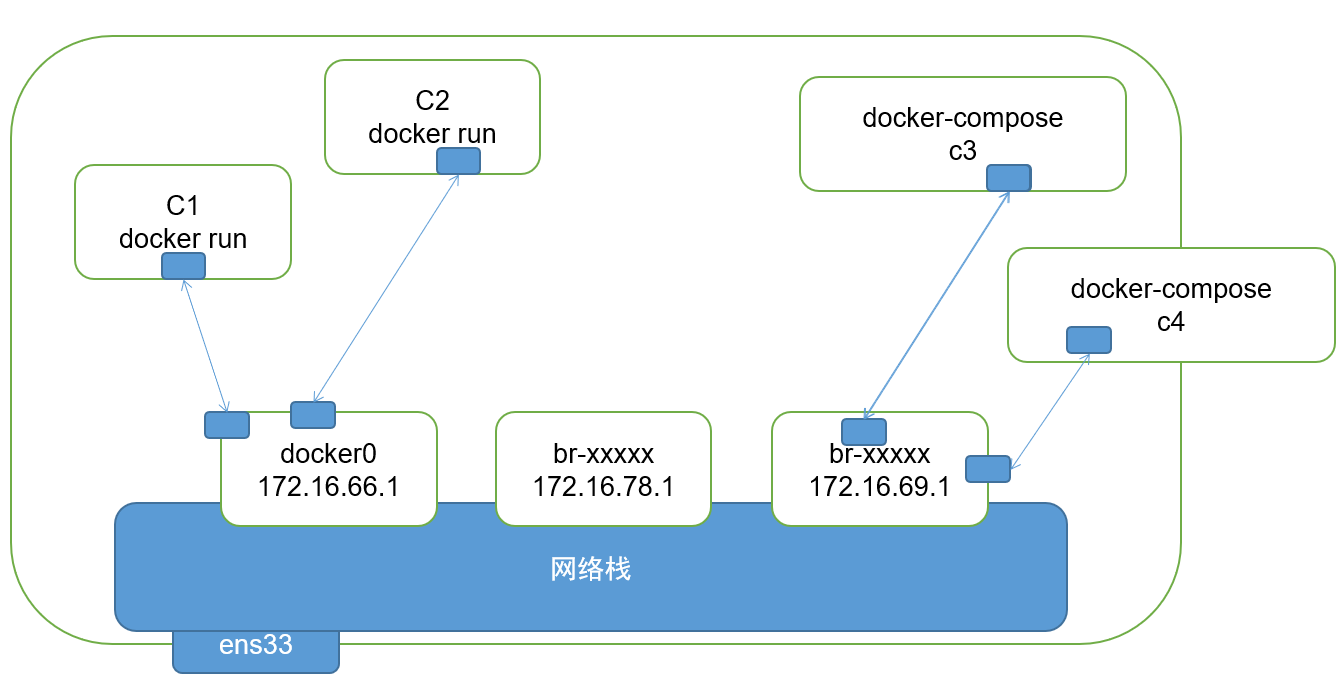
external_links:			#链接外部容器,当前项目以外的容器
 - redis_1				#外部容器
 - project_db_1:mysql
 - project_db_2:postgresql
13、extra_hosts
extra_hosts:					#定义容器中的host
 - "somehost:162.242.195.82"
 - "otherhost:50.31.209.229"
14、labels - docker-swarm
labels:							#给容器定义标签
  com.example.description: "Accounting webapp"
  com.example.department: "Finance"
  com.example.label-with-empty-value: ""
labels:
  - "com.example.description=Accounting webapp"
  - "com.example.department=Finance"
  - "com.example.label-with-empty-value"
15、links:
links:			#与 Docker client 的 --link 一样效果,会连接到当前项目内,其它服务中的容器
 - db
 - db:database
 - redis
16、 logging
logging:					#指定容器的日志存储位置
  driver: syslog
  options:
    syslog-address: "tcp://192.168.0.42:123"

拓展:
	新版 Docker 定义。日志以 jsonfile  进行存储,存储路径位于 /var/log/conatiners/cname.json
17、pid
pid: "host" #指定容器的pid
18、port -p
ports:				#定义外部与容器端口相关
 - "3000"
 - "8000:8000"
 - "49100:22"
 - "127.0.0.1:8001:8001"
19、security_opt
# 为每个容器覆盖默认的标签。简单说来就是管理全部服务的标签。比如设置全部服务的user标签值为USER。
 :
  - label:user:USER
  - label:role:ROLE
20、 stop_signal 15
stop_signal: SIGUSR1 #替换当前容器的停止的信号
21、volumes
volumes:
  // 只是指定一个路径,Docker 会自动在创建一个数据卷(这个路径是容器内部的)。
  - /var/lib/mysql

  // 使用绝对路径挂载数据卷
  - /opt/data:/var/lib/mysql

  // 以 Compose 配置文件为中心的相对路径作为数据卷挂载到容器。
  - ./cache:/tmp/cache

  // 使用用户的相对路径(~/ 表示的目录是 /home/<用户目录>/ 或者 /root/)。
  - ~/configs:/etc/configs/:ro

  // 已经存在的命名的数据卷。
  - datavolume:/var/lib/mysql
22、volumes_from:从其它容器或者服务挂载数据卷,可选的参数是 :ro或者 :rw,前者表示容器只读,后者表示容器对数据卷是可读可写的。默认情况下是可读可写的
volumes_from:
  - service_name
  - service_name:ro
  - container:container_name
  - container:container_name:rw
23、cap_add, cap_drop
cap_add, cap_drop			#给容器添加、移除特权

cap_add:
  - ALL
cap_drop:
  - NET_ADMIN
  - SYS_ADMIN
docker run			#若不指定,默认没有任何特权
--cap-add    Add Linux capabilities(添加特权)
--cap-drop    Drop Linux capabilities(移除特权)
--privileged    Give extended privileges to this container
--device=[]    Allows you to run devices inside the container without the --privileged flag.
SYS_MODULE    Load and unload kernel modules.
SYS_RAWIO    Perform I/O port operations (iopl(2) and ioperm(2)).
SYS_PACCT    Use acct(2), switch process accounting on or off.
SYS_ADMIN    Perform a range of system administration operations.(系统配置特权)
SYS_NICE    Raise process nice value (nice(2), setpriority(2)) and change the nice value for arbitrary processes.
SYS_RESOURCE    Override resource Limits.
SYS_TIME    Set system clock (settimeofday(2), stime(2), adjtimex(2)); set real-time (hardware) clock.
SYS_TTY_CONFIG    Use vhangup(2); employ various privileged ioctl(2) operations on virtual terminals.
AUDIT_CONTROL    Enable and disable kernel auditing; change auditing filter rules; retrieve auditing status and filtering rules.
MAC_ADMIN    Allow MAC configuration or state changes. Implemented for the Smack LSM.
MAC_OVERRIDE    Override Mandatory Access Control (MAC). Implemented for the Smack Linux Security Module (LSM).
NET_ADMIN    Perform various network-related operations.(网络配置特权)
SYSLOG    Perform privileged syslog(2) operations.
DAC_READ_SEARCH    Bypass file read permission checks and directory read and execute permission checks.
LINUX_IMMUTABLE    Set the FS_APPEND_FL and FS_IMMUTABLE_FL i-node flags.
NET_BROADCAST    Make socket broadcasts, and listen to multicasts.
IPC_LOCK    Lock memory (mlock(2), mlockall(2), mmap(2), shmctl(2)).
IPC_OWNER    Bypass permission checks for operations on System V IPC objects.
SYS_PTRACE    Trace arbitrary processes using ptrace(2).
SYS_BOOT    Use reboot(2) and kexec_load(2), reboot and load a new kernel for later execution.
LEASE    Establish leases on arbitrary files (see fcntl(2)).
WAKE_ALARM    Trigger something that will wake up the system.
BLOCK_SUSPEND    Employ features that can block system suspend.
24、extends
extends:				#文件的多个调用
  file: common.yml
  service: webapp

类似其他的一些配置文件:
            nginx.conf
            include  ./nginx-vhost.conf
25、network_mode
network_mode: "bridge"				#指定容器的网络工作模式
network_mode: "host"
network_mode: "none"
network_mode: "service:[service name]"
network_mode: "container:[container name/id]"
26、 networks
services:
  some-service:
    networks:
     - some-network
     - other-network
Example
version: '2'

services:
   db:
     image: mysql:5.7
     restart: always
     environment:
       MYSQL_ROOT_PASSWORD: somewordpress
       MYSQL_DATABASE: wordpress
       MYSQL_USER: wordpress
       MYSQL_PASSWORD: wordpress

   wordpress:
     depends_on:
       - db
     image: wordpress:latest
     restart: always
     ports:
       - "8000:80"
     environment:
       WORDPRESS_DB_HOST: db:3306
       WORDPRESS_DB_USER: wordpress
       WORDPRESS_DB_PASSWORD: wordpress